Fix it
Walking Pad Desk Setup Mistakes: Speed, Shoes, and the Workstation That Fights You
Walking pad desk setup mistakes that ruin the workday walk: walking too fast to type, a desk height that shrugs your shoulders, a low monitor, and a pad placed where it overheats.
A walking pad only earns its desk space when the workstation around it is set up for walking. The pad faults, belt drift, squeaks, and shutdowns, are covered in the walking pad troubleshooting guide. This page covers the setup faults: the speed, desk height, monitor position, shoes, and placement choices that turn desk walking into a wobble, a sore neck, or a pad that keeps shutting down. Most of these cost nothing to fix, and the ones that do cost something cost far less than a pad bought twice.
Walking too fast to type
Desk walking is not exercise walking, and the speed that feels productive on a treadmill is the speed that makes typing fall apart. Most people type cleanly only at a slow stroll, and the pads in this guide all start slow for exactly that reason: the LifeSpan TR1200-DT3 starts at 0.4 mph, the WalkingPad P1 at 0.5 mph, and the UREVO CyberPad and the Egofit Walker Pro M1 both at 0.6 mph. Start at the bottom of the range, find the speed where your typing stays accurate, and accept that it will feel absurdly slow at first. Speed is for the lunch break, when the laptop is closed: the CyberPad runs to 4.0 mph and the LifeSpan to 4.0 mph as well, but neither top speed is a typing speed. If your error rate climbs as soon as you step on, slow down before blaming the keyboard.
Wrong desk height forcing shrugged shoulders
Walking adds a small bounce to every step, and a desk set for sitting puts your shoulders in the wrong place for it. If the desk is too high, your shoulders shrug toward your ears within minutes; if it is too low, you hunch over the keyboard and your lower back complains. Set the desk so your elbows sit at roughly a right angle while you are walking, not while you are sitting still, and recheck it after the first week, because most people settle half an inch lower than their first guess. A standing desk with a memory preset earns its keep here: one preset for sitting, one for walking. The LifeSpan TR1200-DT3, built as an under-desk treadmill with a 50 by 20 in belt and a 350 lb capacity, is the pad most often paired with a proper standing desk in this guide, and the best walking pads for office guide ranks the desk pairings rather than the pads alone.
Monitor too low while walking
A monitor set for a seated eye line sits too low once you are standing and walking, so the neck bends down a few degrees all day and the shoulders follow. Raise the monitor until the top of the screen is roughly at eye level while you are walking on the pad, not while you are sitting in the chair. A monitor arm makes this a one-minute adjustment, and a stack of books does the same job while you test the height. This matters more on pads with a fixed incline, because the grade changes your posture slightly: the Egofit Walker Pro M1 carries a fixed 5% incline, so your standing eye line is a fraction higher than on a flat pad, and the monitor should be set with that in mind. The UREVO CyberPad adds its own twist, with nine auto incline levels up to 9% changed from the remote, so set the monitor for the incline you actually walk at, not the flat setting.
Wrong shoes, or barefoot slipping
Bare feet slip on a moving belt, and socks slip worse. Flat, grippy trainers with a thin sole are the desk-walking default: they grip the belt, keep your footing steady at low speed, and protect your feet from the belt texture over a long session. Avoid thick running shoes with soft, high soles, which make the small bounce of each step feel unstable, and avoid going barefoot, which also leaves your feet directly on a belt that collects dust and grit. The belt size changes the margin for error: the WalkingPad P1 gives a 47 by 16.5 in belt, the longest folding belt in this guide, which forgives a wandering stride, while the Egofit Walker Pro M1 gives a 38 by 15 in belt, the shortest here, where good shoes and a centred stride matter more. Whatever the belt, shoes stay on.
Placing the pad on carpet so it overheats
Thick carpet blocks the airflow under the motor, and a pad that would run happily for hours on a hard floor starts shutting down mid-walk. This is a placement decision, not a pad fault: the troubleshooting guide covers the thermal shutdown itself, and the fix here is to move the pad onto a hard floor or a hard mat before the first long session rather than after the third shutdown. A firm equipment mat under the pad solves it on most floors, and it also protects the carpet from belt dust and the pad from carpet fibres. The heavy pads suffer most: the LifeSpan TR1200-DT3 at 114 lb is furniture that stays put, so its placement decision is made once and lived with, while a light pad such as the UREVO SpaceWalk E1, at about 40 lb with good wheels, can be rolled onto a hard surface for the session and stored away after. Choose the floor first, then the pad position.
No mat under the pad
A pad straight on a hard floor slides a fraction with every step, vibrates more than it needs to, and marks the floor over months of use. A mat under the pad does three quiet jobs: it stops the creep, it damps the vibration that travels into the room below, and it catches the dust and sweat that would otherwise work into the belt edges. It also gives you a visible parking spot, so the pad goes back to the same place every day instead of drifting a few inches toward the desk leg. This matters on the lighter pads that move easily: the UREVO SpaceWalk E1 and the WalkingPad P1, the latter folding fully in half for storage, are both light enough to creep on a smooth floor, and a mat is the cheapest fix in this whole list. Buy the mat with the pad, not after the first scuff mark.
Storing it folded every night and skipping the belt check
Folding pads invite a bad habit: fold it away every night, unfold it every morning, and never look at the belt. The belt drifts a little with every fold, and a belt that is never checked is a belt that starts rubbing one edge, squeaking, and wearing unevenly. The WalkingPad P1 folds fully in half to roughly five inches thick, which is its great virtue and its great temptation: it disappears under the sofa, and so does the maintenance. Make the belt check part of the unfold routine, a quick look at both edges while the pad runs empty at low speed, and re-centre it with the rear roller bolt in quarter turns when it drifts, as the troubleshooting guide explains. If the pad lives unfolded under the desk, the same check belongs in the Monday routine. The best folding walking pads guide compares the folders honestly, and the belt check is the ownership cost they all share.
Using the app for everything when the remote is faster
Apps are the slowest way to change speed mid-walk: unlock the phone, open the app, wait for the connection, find the control, and by then the meeting has moved on. The remote is one button press, and on the pads that matter it controls everything. The UREVO CyberPad is the clearest case, with its nine auto incline levels to 9% changed from the remote mid-walk, a feature nothing else in a flat pad does, and the incline is only useful if you can change it without breaking stride. Keep the remote on the desk in a fixed spot, learn its buttons by touch, and leave the app for the weekly step totals. The CyberPad review covers the remote in detail, and the CyberPad vs Egofit Walker Pro comparison shows the other side of the coin: the Egofit has a fixed 5% incline with no mechanism to adjust, so there is nothing to fumble with at all, which some owners prefer.
Still stuck? Compare the current top picks
Full ranked list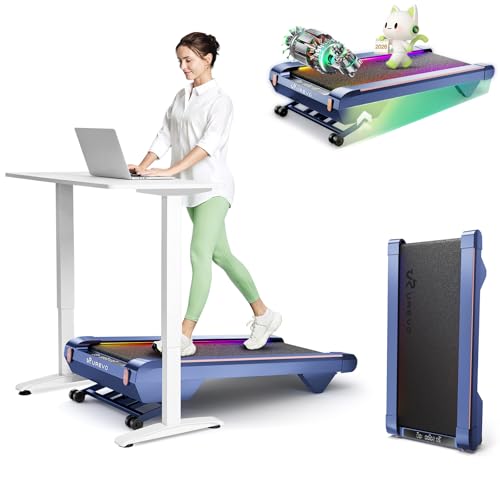


FAQ
Walking Pads questions, answered straight
What speed is best for typing while walking?
Start at the lowest speed your pad offers, which is 0.4 mph on the LifeSpan TR1200-DT3 and 0.5 to 0.6 mph on the other pads in this guide, and raise it only while your typing stays accurate. Most people settle at a slow stroll well below their walking pace. If your error rate climbs, slow down: the typing is the work, and the walking is the bonus.
Do I need special shoes for a walking pad?
No, just flat, grippy trainers with a thin sole. Thick running shoes feel unstable on a moving belt, and bare feet or socks slip. The shoes you already own for the gym are usually the right pair, and the belt size decides how much a wandering stride is forgiven: the WalkingPad P1 at 47 by 16.5 in is the most forgiving folder here.
How often should I check the belt?
A quick look at both edges while the pad runs empty at low speed, once a week, or every time you unfold a folding pad. Re-centre with the rear roller bolt in quarter turns when it drifts, and lubricate per the manual. The troubleshooting guide covers the belt checks step by step, and the habit costs less than a minute.
Is a standing desk required for a walking pad?
Effectively yes, unless your desk already adjusts to standing height. A fixed sitting desk cannot be raised to walking height, so the desk height and monitor fixes in this guide have nowhere to go. A basic height-adjustable desk with a memory preset for walking is the purchase that makes the pad work, and the best walking pads for office guide treats the desk as part of the setup rather than an accessory.